
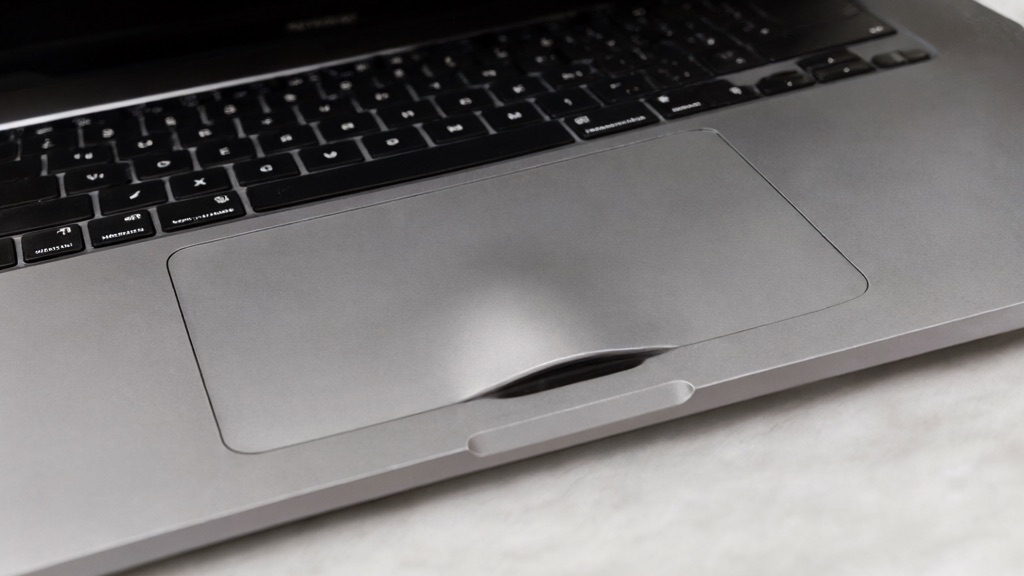
You open your laptop and the trackpad sits a little higher than it used to. Press it and it does not spring back the way it should. The seam along the edge has started to part, and when you set the machine down, it rocks on one corner. None of this is a normal "battery life got worse" complaint. This is the shape of a possible swollen battery, and it changes what you should do in the next few minutes.
What swelling looks like, and why it is not the same as a tired battery
A battery that simply holds a shorter charge is a performance problem you can live with and fix at your convenience. Physical deformation is different. Look for:
- A trackpad or keyboard that has lifted or become uneven
- Case seams that have opened or a bottom cover that has bulged
- A laptop that rocks on a flat desk instead of sitting level
- A hinge that no longer closes flush
Swelling means gas has built up inside a lithium-ion cell, and the cell is physically expanding. That is a safety condition, not a convenience problem, and it warrants stopping use rather than pushing through to finish a document. Poor battery life and a warped case are two different things with two different urgencies.
Do this first, before you diagnose anything
- Power it down and unplug it (if you can reach the power safely).
- Stop charging it. Continued charging adds stress to an already stressed cell.
- Do not press the case flat, pry it open, or puncture anything. Forcing a swollen cell is how small problems become fire and injury.
- Get handling and transport guidance before you move it. A warped laptop should be carried carefully, not tossed in a bag with the swollen side pressed against other things.
- If you can still reach files safely, back up the important ones — but only if the machine is stable and not heating up. If it is unstable, skip this and go straight to getting it seen.
Why the obvious fixes are the wrong ones
The internet will tell you to push the trackpad back down, ship the laptop, or toss it in the trash. All of these create risk with a swollen lithium battery:
- Pressing the case flat deforms the cell further and can damage its internal structure.
- Prying or puncturing can vent flammable material and cause a fire.
- Mailing it without proper damaged-battery handling violates carrier rules and puts the package at risk in transit.
- Household trash is not where a damaged lithium battery belongs; it can ignite in a bin or a collection truck.
For disposal, follow the manufacturer's instructions for your exact model and the rules of your local battery recycling program for damaged lithium batteries, as outlined by the EPA's guidance on used lithium-ion batteries. Apple publishes model-specific safety information, such as its MacBook Air safety guidance. The point is not to DIY the removal; it is to keep the cell intact until a proper handler deals with it.
What to tell us, and how to check for a recall
Before you arrange anything, you can check for a recall without powering the laptop back on. Look up the exact model and serial number on the manufacturer's recall or safety-notice page (the serial is usually on the bottom of the case). If your model is part of a battery recall, that changes the right path entirely, and it is worth confirming before a repair.
When you call, have ready: the exact model and serial number, where the swelling is, whether the machine still powers on, whether it gets hot, and what you have already done. That lets us give you safe handling guidance before you drop it off. See our Battery Replacement service.
Frequently asked questions
Can a swollen battery still hold a charge?
Sometimes, partially, but unreliable. Swelling is a sign the cell is degrading and unsafe, so continued use is not worth the risk even if it appears to work.
Should I try to back up first?
Only if the machine is stable and not heating up. If it is rock-solid, hot, or deforming further, do not power it on to save files — get it assessed instead.
Can I push the trackpad back down?
No. Pressing a swollen cell flat can damage it and trigger a dangerous reaction. Leave the deformation alone until a proper handler addresses it.
Can I mail the laptop?
Not in the way you would a normal package. Damaged lithium batteries have specific carrier and packaging rules. Call us first for safe transport guidance.
Call before you move it
Handling a swollen battery safely matters more than getting the laptop to us quickly. Reach out first and we will tell you exactly how to carry and set it down. Contact us, or call 716-771-2536 to arrange a drop-off by appointment in Amherst, NY. We service Mac and PC, and safety comes before the repair.